
For the DevOps or CTO who owns security — among other things
Secure your code, cloud and attack surface — in one platform
Continuous scanning and monitoring across your whole pipeline, with findings you can verify in a second — and a price you don’t need a committee to approve.
Full functionality · No credit card · first map of your perimeter in 5–10 minutes
Security across your entire pipeline — from code to attack surface
Most tools secure a single stage. Topscan covers them all — static analysis in your code, dynamic scanning in production, and continuous monitoring of everything exposed to the internet
- Step 1
SAST
Code patterns, secrets and dependencies — caught before they ship
- Step 2
CI/CD webhook
Gate every build. Trigger scans from the pipeline you already run
- Step 3
AWS integration
Find misconfigurations in the EC2 and Route 53 resources you expose
- Step 4
DAST · TLS/SSL
Scan live services for vulnerabilities and catch certificates before they expire
- Step 5
Attack surface
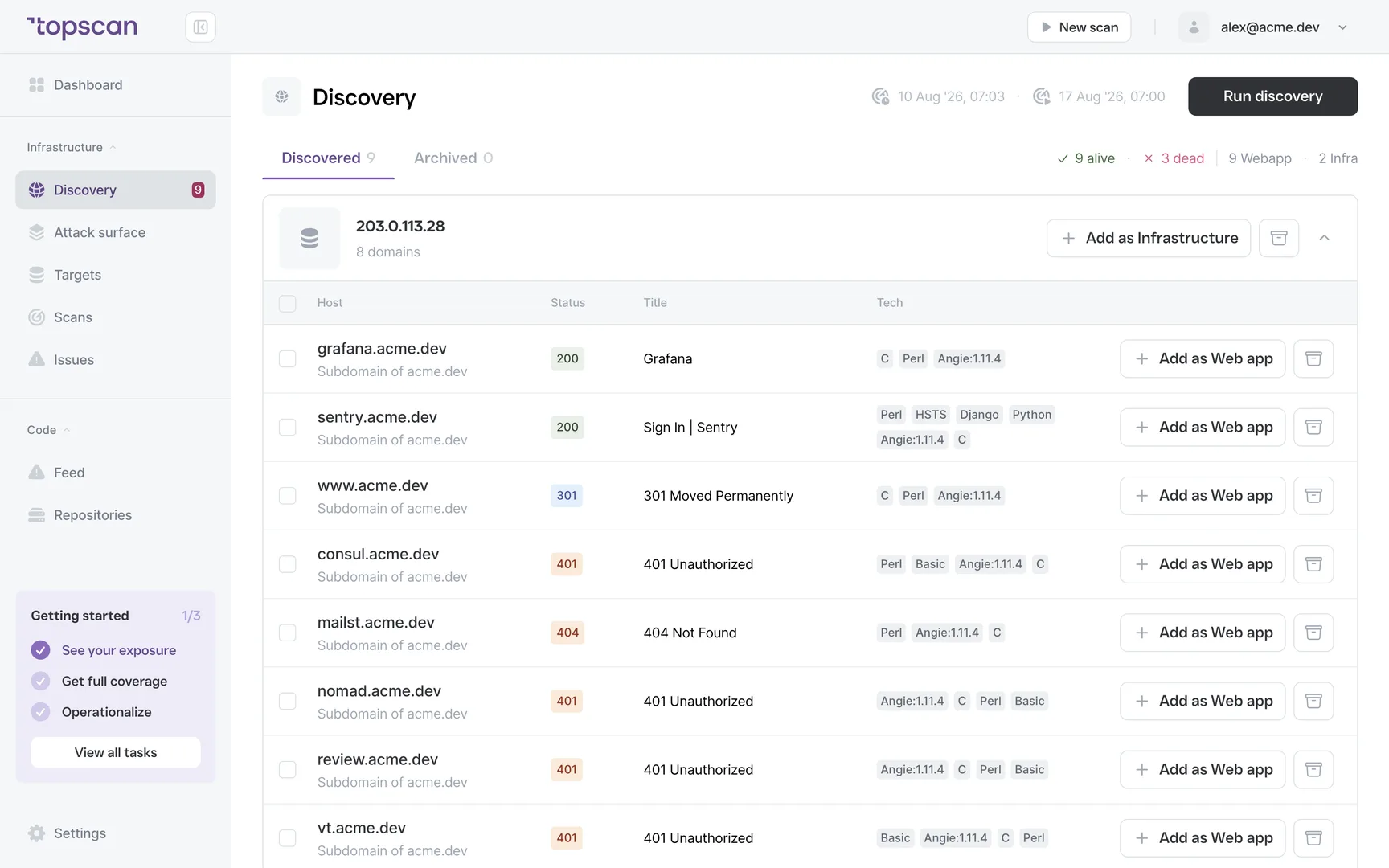
Discover new hosts and watch your external attack surface 24/7
Everything Topscan does, on one screen
Twelve capabilities across five areas — perimeter, apps, code, cloud and workflow. One subscription, not a bundle of add-ons
- PerimeterLearn more →
External Infrastructure Scanning
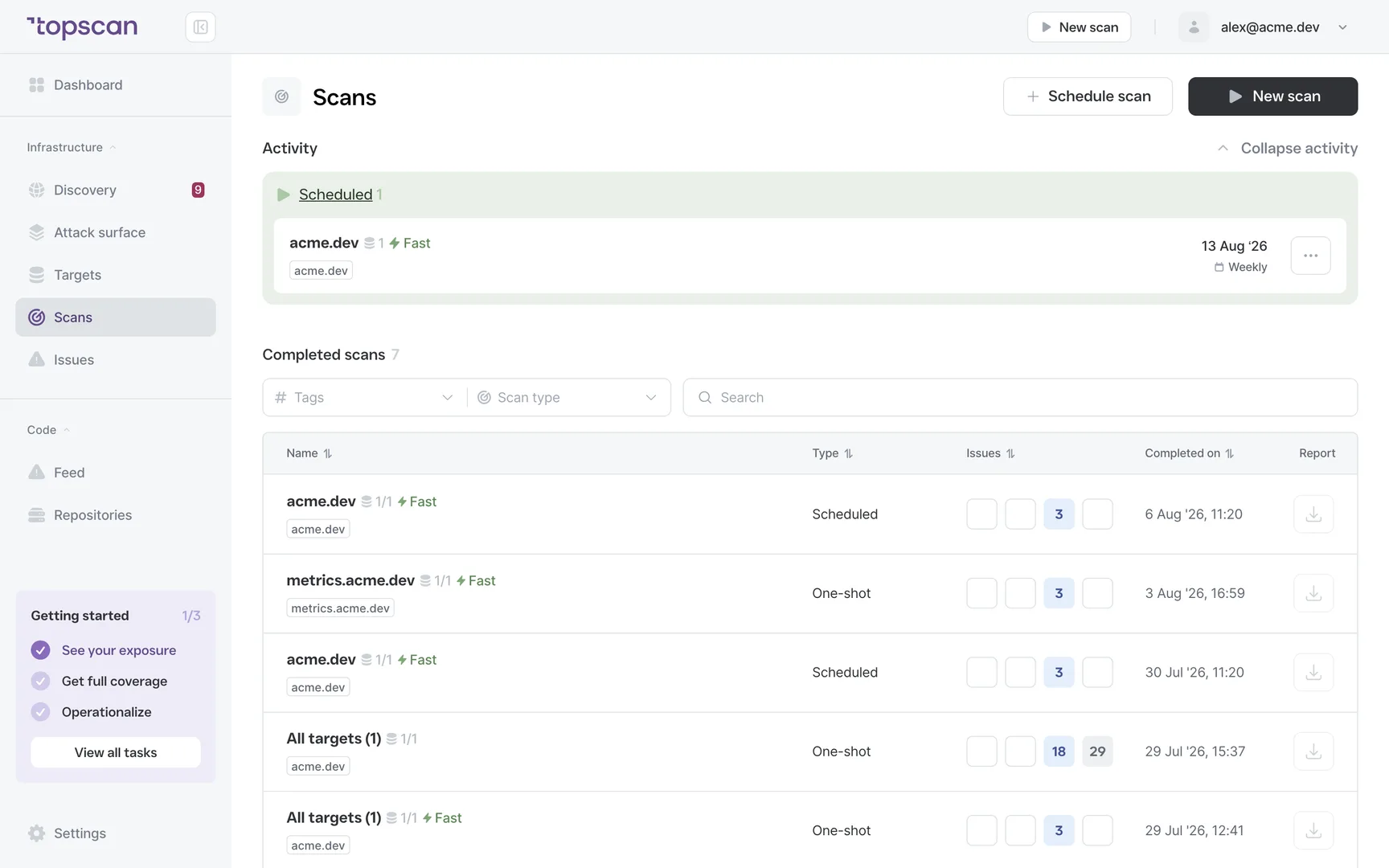
Open ports, service versions and known server vulnerabilities, matched against CVE databases — your hosts the way an attacker sees them. Unlimited scheduled rescans.
- PerimeterLearn more →
Attack Surface Monitoring
Every exposed service inventoried and watched — respond to changes, not surprises.
- PerimeterLearn more →
Asset Discovery
Subdomains and hosts you forgot about — revealed before someone else finds them.
- PerimeterLearn more →
Certificate Watch
TLS/SSL expiry caught weeks early — not on the Friday night it happens.
- AppsLearn more →
Web App Scanning (DAST)
OWASP-class checks on live apps: SQL injection, XSS, exposed admin panels, default credentials, missing headers.
- CodeLearn more →
Static Code Analysis (SAST)
Three kinds of risk in one scan: vulnerable code patterns, committed secrets and keys, and known CVEs in dependencies. On every commit, pointing at the exact line.
- CodeLearn more →
CI/CD Webhook
A unique Event link you call from the last step of your deploy script — no API keys required.
- CloudLearn more →
AWS integration
EC2 and Route 53 resources discovered automatically, added to monitoring and rescanned when they change.
- WorkflowLearn more →
Vulnerability Management
Statuses, SLA clocks with overdue flags, snooze and false positives — plus a triage mode for big backlogs.
- WorkflowLearn more →
Noise Filtering
Informational findings stay out of your feed and never touch the Security Score.
- WorkflowLearn more →
Security Score
One number that tracks your whole estate over time — progress you can show yourself, your CEO, or an auditor.
- WorkflowLearn more →
Slack & MS Teams Alerts
Findings reach the team where it already talks — not another inbox to check. New results, fixed issues and discovered hosts, delivered as they happen. Chat and tracker routing starts on Advanced.
One subscription, not three
Covering your pipeline usually means paying separate vendors for SAST, DAST and attack-surface monitoring — three contracts, three bills, three tools to wire together. Topscan replaces them with one.
Separate Vendors
Traditional stack
SAST
Code monitoring, CI/CD
$89/mo
DAST
Web app & infrastructure scanning
$119/mo
ASM
Attack surface monitoring
$249/mo
Total, three vendors
Typical list prices for comparable standalone tools
$457/mo
from$129/month
Save $328/month vs a paid SAST + DAST + ASM stack
- SAST — code monitoring
- DAST — web app & infrastructure scanning
- ASM — subdomains, ports, exposed services
- SLA Tracking
- Task manager integrations
- Continuous scanning
- Unlimited users & scans
One platform for your whole pipeline
Everything inside, module by module
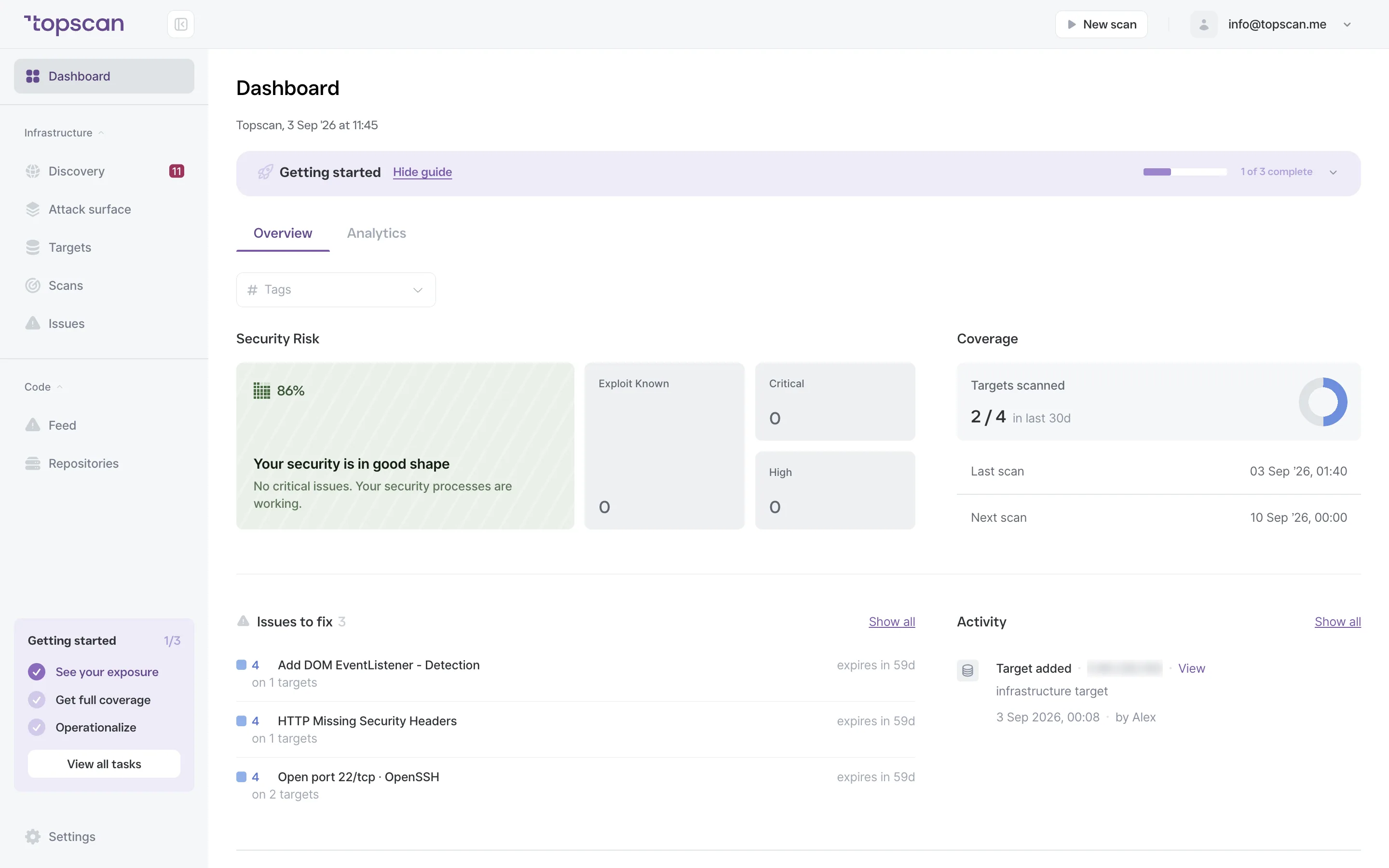
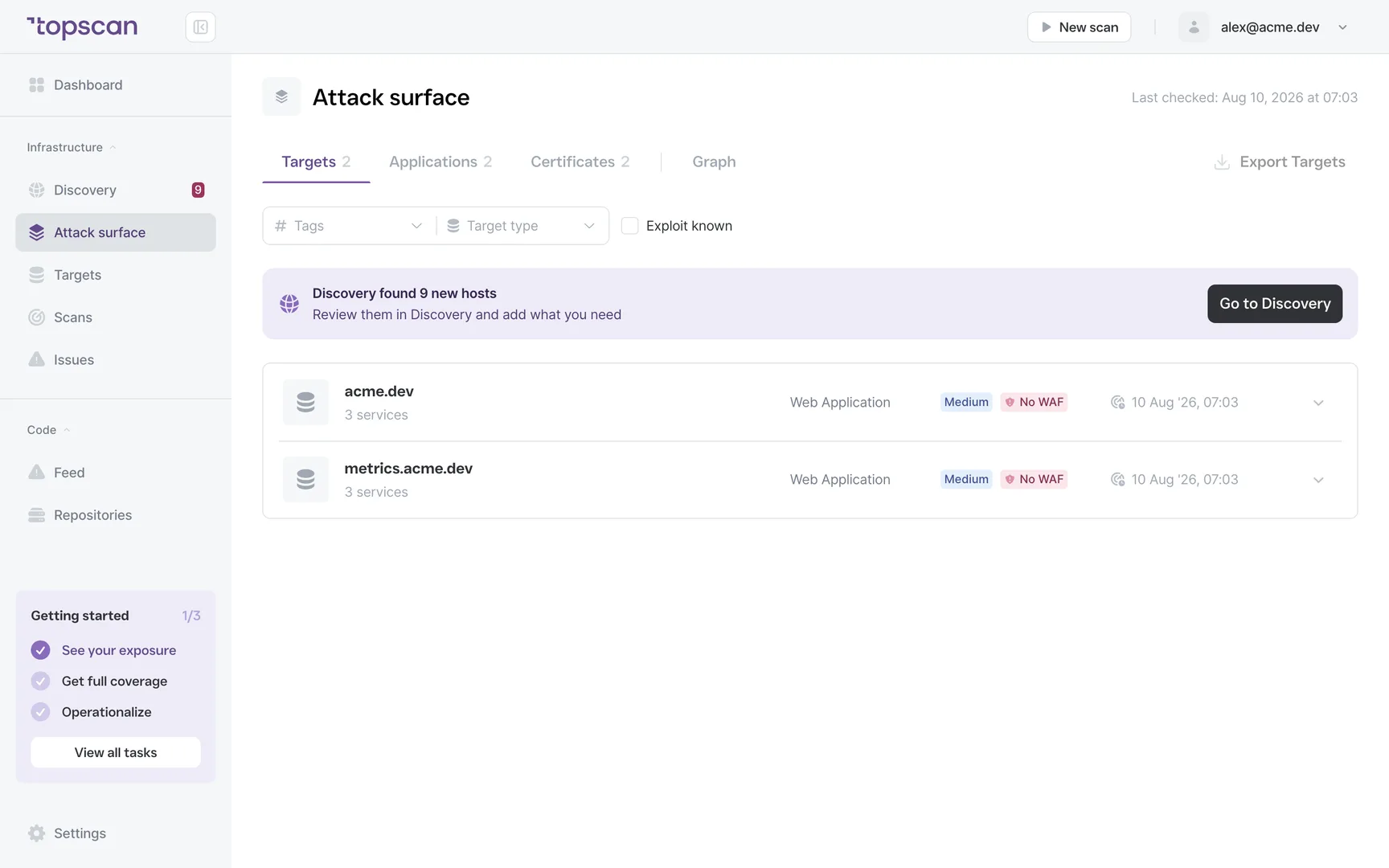
Click through what the subscription actually covers — every screenshot is the live product, not a mockup.
Every domain, subdomain, service and certificate you expose — inventoried and watched continuously. New hosts land here with a review prompt before an attacker finds them.
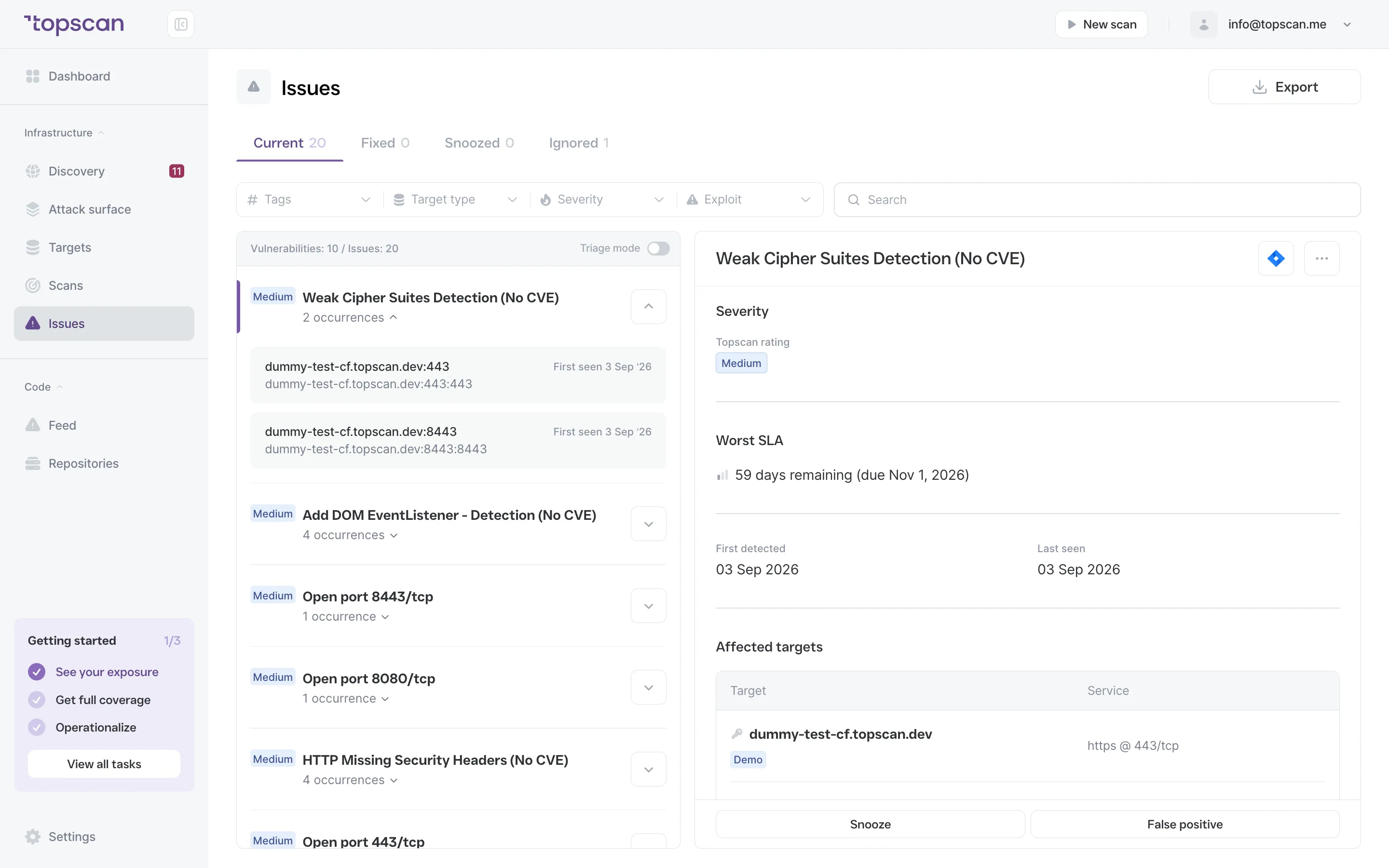
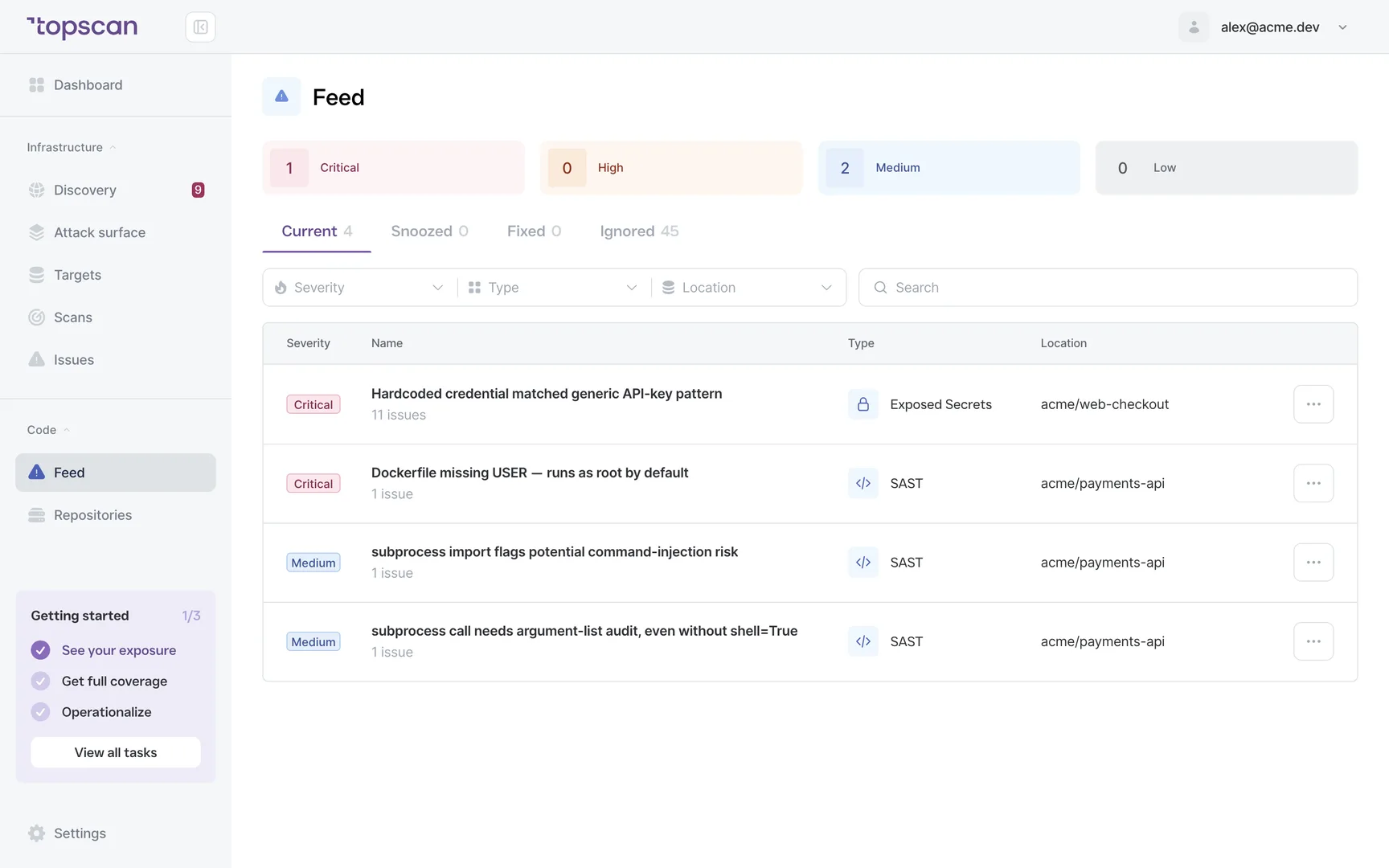
1of5
Walk through it before you sign up
Six clicks through the real product — from adding a target to your code and back. No form, no demo call.
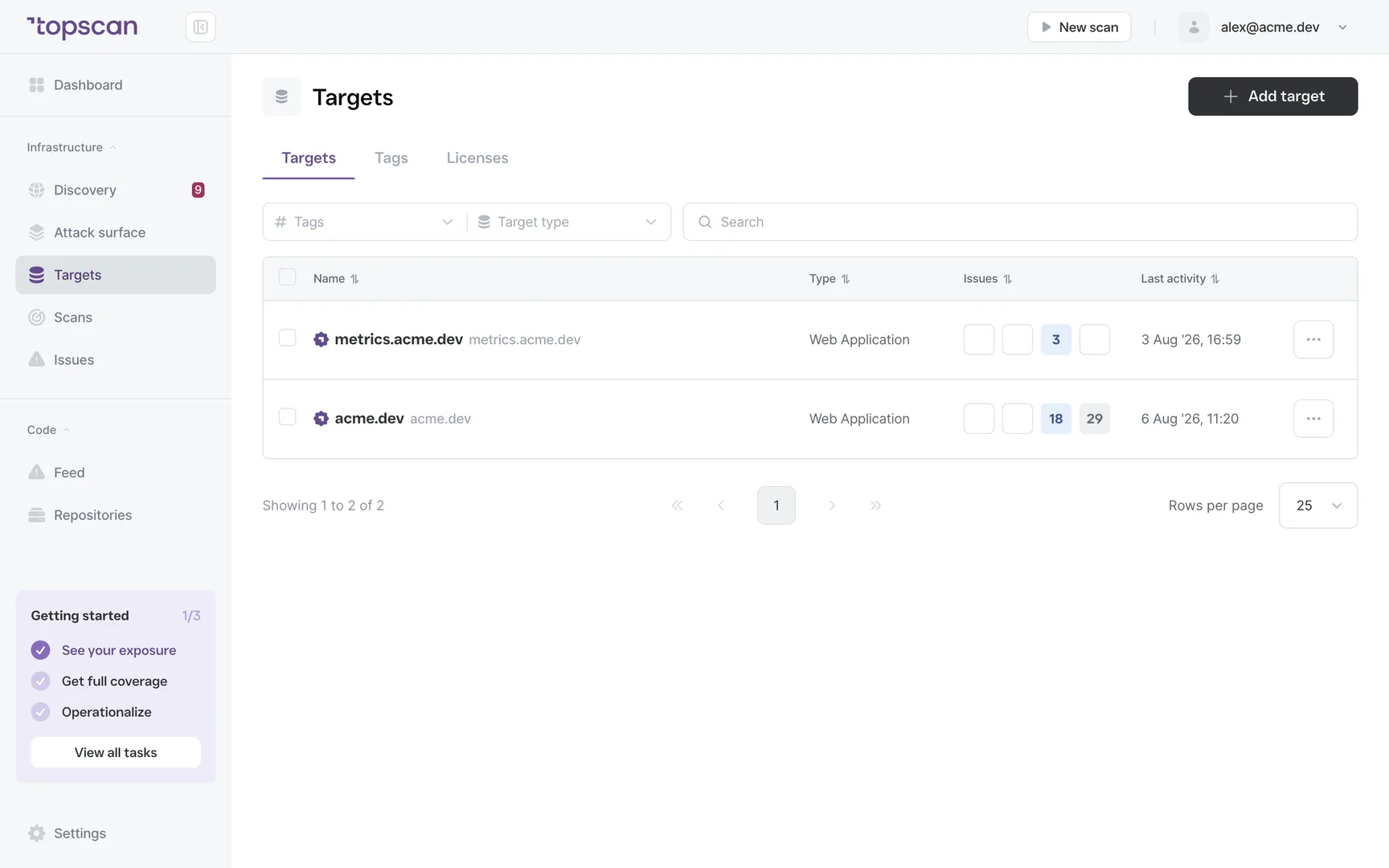
Step 1 · Add a target
A domain or an IP — that's all Topscan needs to start. No agent, nothing installed on your servers.
Step 1 of 6 — click the highlighted spot
Fits the workflow you already have
Repositories connect from GitHub or GitLab, findings reach the team in Slack or Microsoft Teams and turn into Jira tickets, scans trigger from your CI/CD webhook, and AWS connects to discover EC2 and Route 53
 GitHub
 GitLab
 Slack
Slack MS Teams
 Jira
Jira AWS
AWS- CI/CD webhook
Security, without the theater
A 40-page PDF nobody readsA wall of 9.8-critical alerts"Book a demo to see pricing"Per-seat billing for reading a list
Findings are tasks with evidence — host, header, certificate date — not literature.
Severity reflects your context, and noise is ignored before you ever see it.
The price is on this page. So is the product — scroll up and click through it.
Unlimited users on every plan. Auditors read free.
The whole perimeter — code, cloud, internet — for the price of a single tool
One subscription from $129/month. That's the entire pitch
FAQ
Topscan builds on the best in class scanning engines
Still have questions?
Contact usPricing is per target, and there are three kinds. An infrastructure host — one IP, hostname or subdomain — is $4 a month, with 3 included on Basic and 8 on Advanced. A web application, meaning one running app tested from the outside, is $45, with 1 included and 2 on Advanced. A repository for code scanning is $9, with 10 included and 20 on Advanced. Discovery is free and maps your whole footprint: a licence is used only when you put a host under monitoring, so the hosts you dismiss cost nothing. Rescans are unlimited, users are unlimited, and read-only seats for auditors are free.
You can, and running a scanner is the easy part — the engine isn't the product. Running a scanner is a Tuesday afternoon. Knowing that a new staging.admin appeared last week, that a certificate expired 41 days ago, and that a host you'd forgotten was quietly answering the whole time — that's a system, not a scan. Topscan keeps the inventory, watches it continuously, tracks what you accepted versus fixed, and holds the evidence an auditor asks for.
Add a domain while you sign up and discovery answers within five to ten minutes — that is your first map of what faces the internet, before anything is scanned. Scanning comes after you confirm what to monitor: a fast check finishes in five to fifteen minutes, a full infrastructure audit in thirty to ninety, and a deep web application scan can run up to a few hours. Those are typical times, not guarantees — the real duration depends on the target.
No for external scanning — you add a domain or IP and it starts. SAST connects to your repository, CI/CD gating goes through a webhook, and AWS connects with keys you issue to discover EC2 and Route 53. Nothing runs on your servers.
A pentest is a deep look on one day. This is a shallow look every day. A pentest tells you how far someone could get; continuous monitoring tells you what changed since Friday. Most incidents start with something that appeared after the last release.
That's what most teams use it for. Auditors ask for evidence of regular scanning and an inventory of what's exposed — both are produced automatically: scan history with downloadable reports, and an exportable asset inventory. Auditor seats are free and read-only.
Every finding ships with the evidence that produced it — hostname, status code, response banner, certificate date — so you can verify it in a second. Mark it as a false positive or snooze it, and it stops resurfacing. We'd rather report less and be checkable than report more.
You authorise scanning when you add a target and confirm ownership. Default discovery uses public registries, DNS and a single ordinary HTTP request. Port scanning and active vulnerability templates run only on targets you've explicitly confirmed — that boundary is deliberate, because in some jurisdictions an unauthorised port scan is a criminal matter.
Customer data is stored in the Hetzner cloud in Ashburn, Virginia, US. None of the developers have access to the production environment; only the Head of DevOps has access, and all his actions are logged. No customer data leaves our infrastructure or is transmitted to third-party systems (such as third-party AI services); all operations take place within a closed environment. We are currently undergoing a SOC 2 audit and monitoring our processes via Drata. In the event of account deletion, all data will be permanently removed from our servers within 180 days. Your source code is cloned for the scan and the clone is deleted afterwards — only the affected lines are kept.